


Offline AI for iPhone
Can an iPhone run AI without internet?
Yes. Download a model once and Loci can draft, summarize, brainstorm, explain, and answer on your iPhone in airplane mode.
What matters
- The model, not just the app, is stored on the iPhone.
- Prompts and replies are generated locally during ordinary chat.
- Speed and model choice depend on the iPhone's available memory and storage.
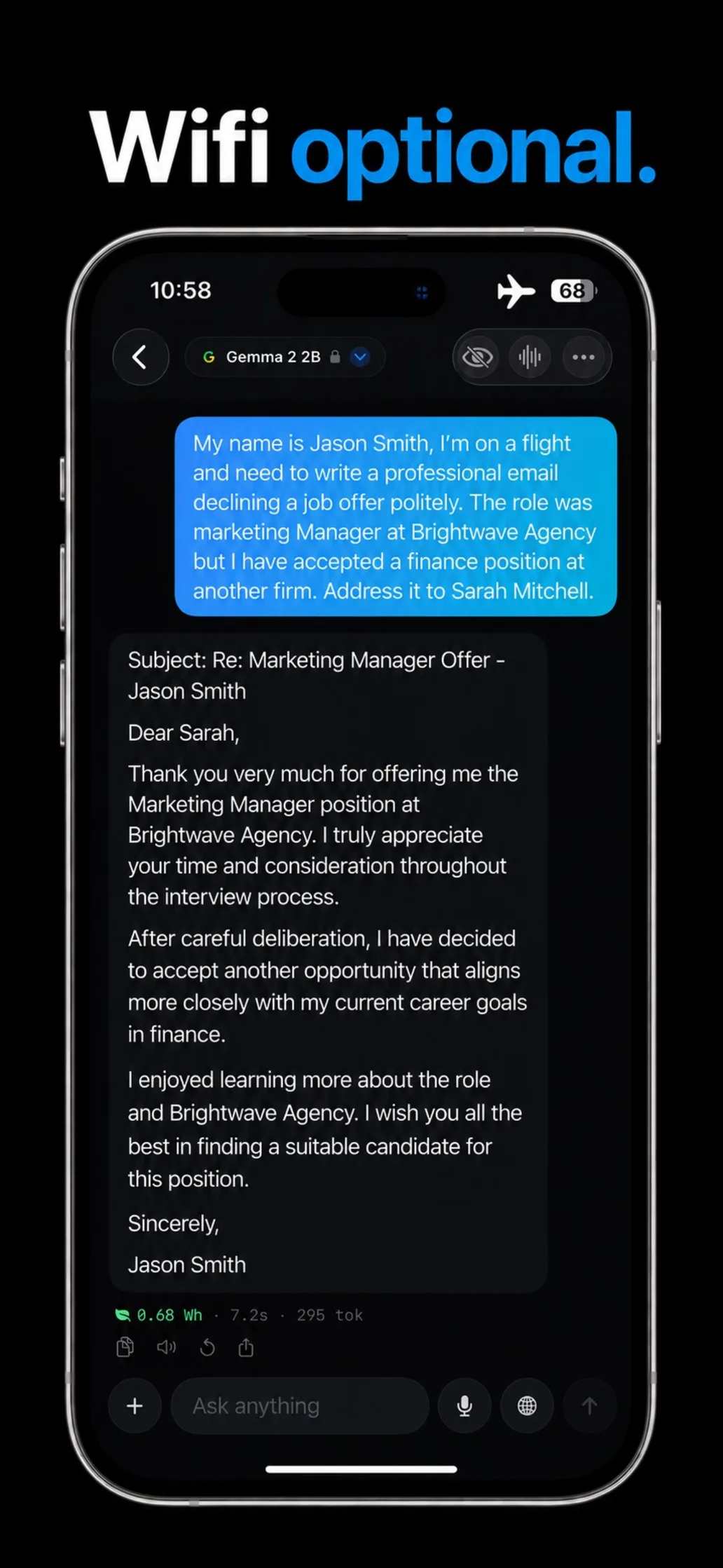
Run a 90-second airplane-mode test
This checks whether the answer depends on a remote AI server.
Finish one model download
Open Loci while you have Wi-Fi and wait until the selected model is ready. The model file is what makes local answers possible.
Ask a question with a useful follow-up
Try: “Make a three-day packing list for Vienna in October.” Then ask it to fit everything into one carry-on.
Turn on airplane mode
Disable Wi-Fi and cellular access. Keep the same conversation open.
Ask the follow-up again
The reply continues because generation is happening on the iPhone. Start a second chat if you want to test a clean conversation too.
What the test proves: Loci can generate an answer with no network path available. It does not prove every privacy claim by itself; diagnostics, downloads, and optional online features need their own disclosure.
What works offline — and what does not
Offline does not mean every feature in the app becomes local. It means the core model can read your prompt and generate a reply without contacting an inference server.
| Task | Works offline? |
|---|---|
| General chat | Yes |
| Drafting and rewriting | Yes |
| Summarizing supplied text | Yes |
| Photo questions | Model-dependent |
| Voice conversation | Yes |
| Current news, weather, or scores | No |
| Installing another model | No |
The privacy boundary, precisely
Loci does not send prompts, replies, files, images, audio, memories, calendar data, or reminders to a remote AI provider. Core generation happens on the iPhone.
That does not mean the app never uses a network connection:
- Anonymous diagnostics are optional. When enabled, technical performance and reliability events can be sent to Loci. They exclude prompts, replies, and personal content.
- Model downloads retrieve files. Model weights are fetched from public repositories on Hugging Face. No conversation content is included.
The honest tradeoff
The largest cloud systems have far more computing power than a phone. They can be better at difficult reasoning, large research tasks, and questions that depend on fresh information. Local models are smaller because they must fit into the iPhone's memory.
The benefit is a different kind of reliability: private questions can stay on the device, the assistant remains available without coverage, and ordinary chat does not depend on an account, a remote model, or a provider's usage limits.
Which iPhone should you use?
Loci requires iOS 18 or later. Newer iPhones can usually run larger or faster models, while memory-tight devices need smaller ones. Storage matters too because every local model is a real file.
Loci evaluates the hardware and recommends compatible models. It also shows the download size before installation, so you can make the tradeoff before using storage.
Questions about offline AI on iPhone
Can an iPhone really run AI without internet?
Yes. Loci downloads a language model to the iPhone and runs it with the device's own processor and memory. After that download, core chat works without Wi-Fi or cellular service.
What does Loci need the internet for?
Model downloads and app updates need a connection. Everyday chat, writing, summarizing, coding help, and supported image questions run locally.
Will offline AI know today's news or weather?
No. Current news, weather, prices, and scores are not available from the offline model alone.
Does airplane mode prove that Loci is private?
It proves that Loci does not need a remote inference server to answer. See Loci's privacy policy for details about data flows.
Which iPhones can use Loci?
Loci requires iOS 18 or later. Model availability and speed depend on the iPhone's processor, memory, and free storage. Loci recommends models that fit the device.
Is offline AI as capable as the largest cloud models?
Not in every task. Large cloud models can be stronger at complex research and difficult reasoning. A local model trades some scale for privacy, availability, predictable access, and no per-message server dependency.
Product details
Try the proof
Take Loci into airplane mode.
Download Loci and a model while you have Wi-Fi. Then run the test before your next flight or trip.